An AI report says a software plan costs $20 a month. You put $240 in the annual budget. Then you open the pricing page: the price is $20 per person. Your ten-person team would pay $2,400.
This is an illustrative example, but it's the kind of mistake worth checking before you use an AI report. The answer can sound reasonable, include a source link, and still lead you to the wrong decision.
Start with the facts behind the recommendation. Open their sources, check that the details apply to you, and redo any important calculation. We used this process in two real Okou research conversations on November 24, 2026. The screenshot below shows a correction in a test workspace using public sources.
What should you check first?
Begin with a sentence that could change what you do.
If you're buying software, that might be the price or a feature your team needs. If you're preparing a competitor presentation, it might be a claim that another company doesn't offer something. If you're writing a market report, it might be the number behind your estimate of the opportunity.
Suppose the report says:
This plan is the best option for our team because it costs $20 a month and includes video review.
There are several things to check. Is $20 the price for the whole team? Is it available on monthly billing? Does video review belong to the plan in the budget, or a higher tier?
Check those details before polishing the report's wording.
1. Open the source behind the claim
Click the citation and find the sentence, price, or table that supports the statement. Read the surrounding text too.
The page may mention the feature without including it in the plan you're considering. It may describe a product that has since changed. Sometimes the link goes to a homepage that doesn't support the claim at all.
You can ask the assistant:
Find the passage that supports this sentence. Give me the original page and explain any conditions we left out.
Then open the page yourself. You're checking whether the source says what the report says it does.
The University of Maryland's fact-checking guide calls this “lateral reading”: leave the AI answer and consult other sources. In everyday terms, open another tab instead of asking the same chatbot whether it's sure.
Use a source that can answer the question
For an advertised feature, start with the product's own documentation. For the cost, look at the relevant pricing page or quote. For customer experience, look beyond the company's sales copy.
A vendor can tell you that its product supports reminders. Its website alone cannot show that reminders will work reliably in your particular setup. That takes a test.
2. Check who, when, and which plan
A statement can be accurate and still be wrong for your situation.
“This product connects to Google Drive” may depend on the subscription, account settings, or permission to read a file. “This tool supports video review” may refer to a more expensive plan than the one in the budget.
For software research, check these details:
| Detail | A useful question |
|---|---|
| Plan | Is this feature included in the plan we're pricing? |
| Billing | Is the displayed monthly rate conditional on paying for a year? |
| People | Does the price apply per employee or per account? |
| Date | Is this still the offer available to us? |
| Access | Can our actual account use the source or feature described? |
Keep these questions next to the relevant claim. You don't need to fill out a large spreadsheet before checking a short report.
Be careful with dates. “Read today” means someone retrieved the information today. It doesn't mean the author updated the page today. If a quote matters to a purchase, check the live offer or ask the supplier to confirm it.
3. Redo the calculation
Check the units before the arithmetic.
In our opening example, the price is $20 per person per month. Ten people for a year means:
$20 × 10 people × 12 months = $2,400 per year.
The original $240 budget wasn't a multiplication error. It used the wrong number of paid users.
Our client approval software comparison shows another common trap: comparing prices that use different billing units.
For five internal users, GoVisually Pro displayed $33 per user per month on annual billing and $40 per user on monthly billing when we checked it on November 24, 2026:
- Annual payment: $33 × 5 × 12 = $1,980 for the year.
- Monthly billing: $40 × 5 = $200 per month, or $2,400 across twelve payments.
PageProof Team uses a whole-team price. Its annual option displayed $2,499 per year. We didn't multiply that amount by five users. Its $249 monthly option would total $2,988 across twelve payments, a different billing choice.
We asked Okou to recheck the budget and keep those units explicit. We also opened the billing controls on the official pages ourselves. A text extract can miss prices that appear only after switching from monthly to yearly billing.
Click the screenshot to view it at full size.
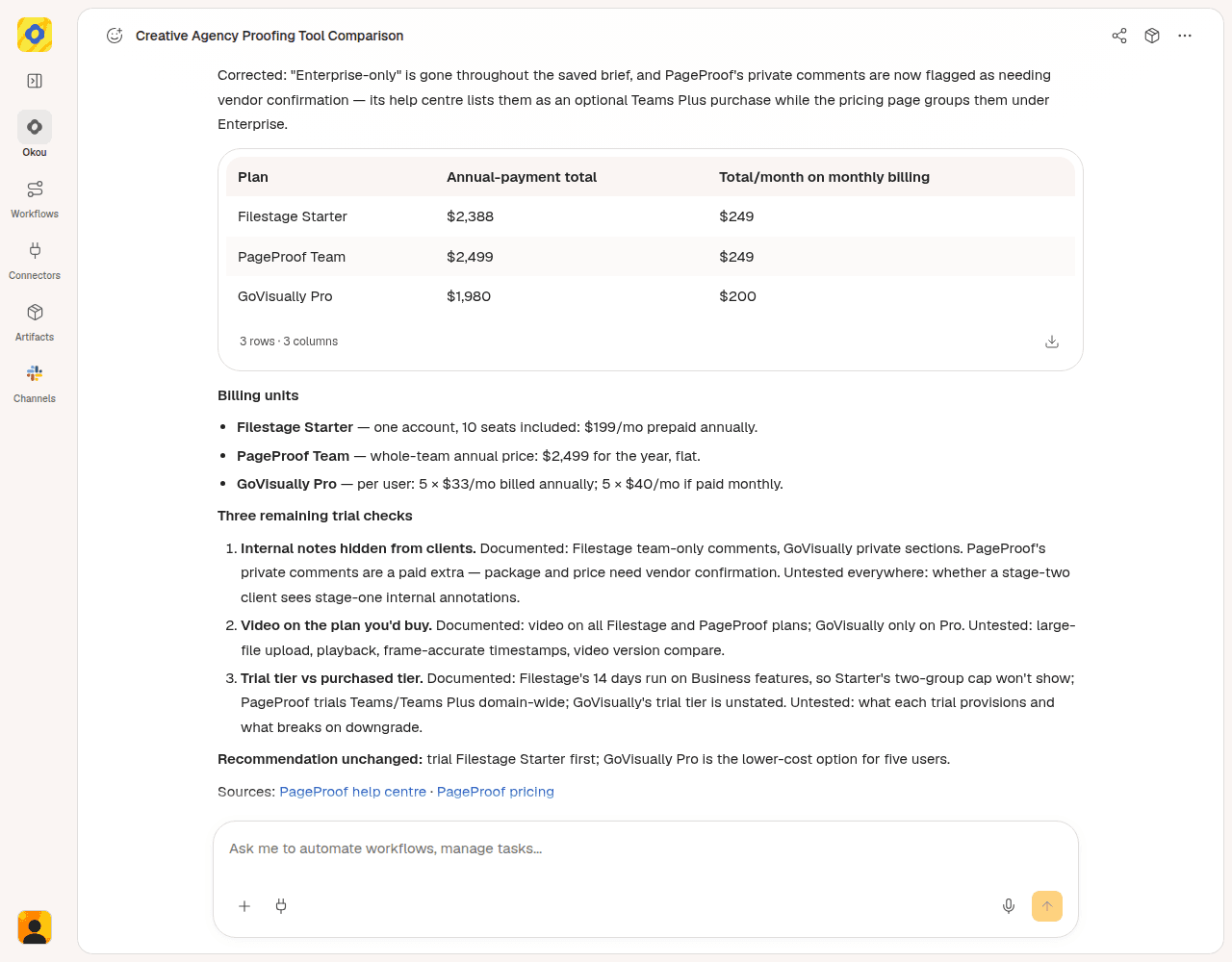
The reviewed budget uses the actual team size and distinguishes annual payment from monthly billing. The amounts exclude taxes and optional additions.
The same habit helps with percentages. If a report says sales grew 40%, ask for the starting amount and time period. If it calculates market size, separate the sourced numbers from assumptions about how many people will buy.
4. Investigate disagreements
When two pages disagree, ask what might explain the difference. They may describe different dates, plans, countries, or versions of a feature.
Our vendor-comparison answer called PageProof's private comments “Enterprise-only.” Its pricing FAQ describes private comments among Enterprise features. But the Teams and Teams Plus help article also lists them as an optional purchase on Teams Plus.
We checked both pages and asked Okou to remove the exclusive claim. The revised report leaves the current package and price as something to confirm with the vendor. The entry Team plan should not be assumed to include private comments either.
This is a useful stopping point for public-source research: the pages establish that the original statement was too strong, but they don't give us a confirmed quote for the setup we need.
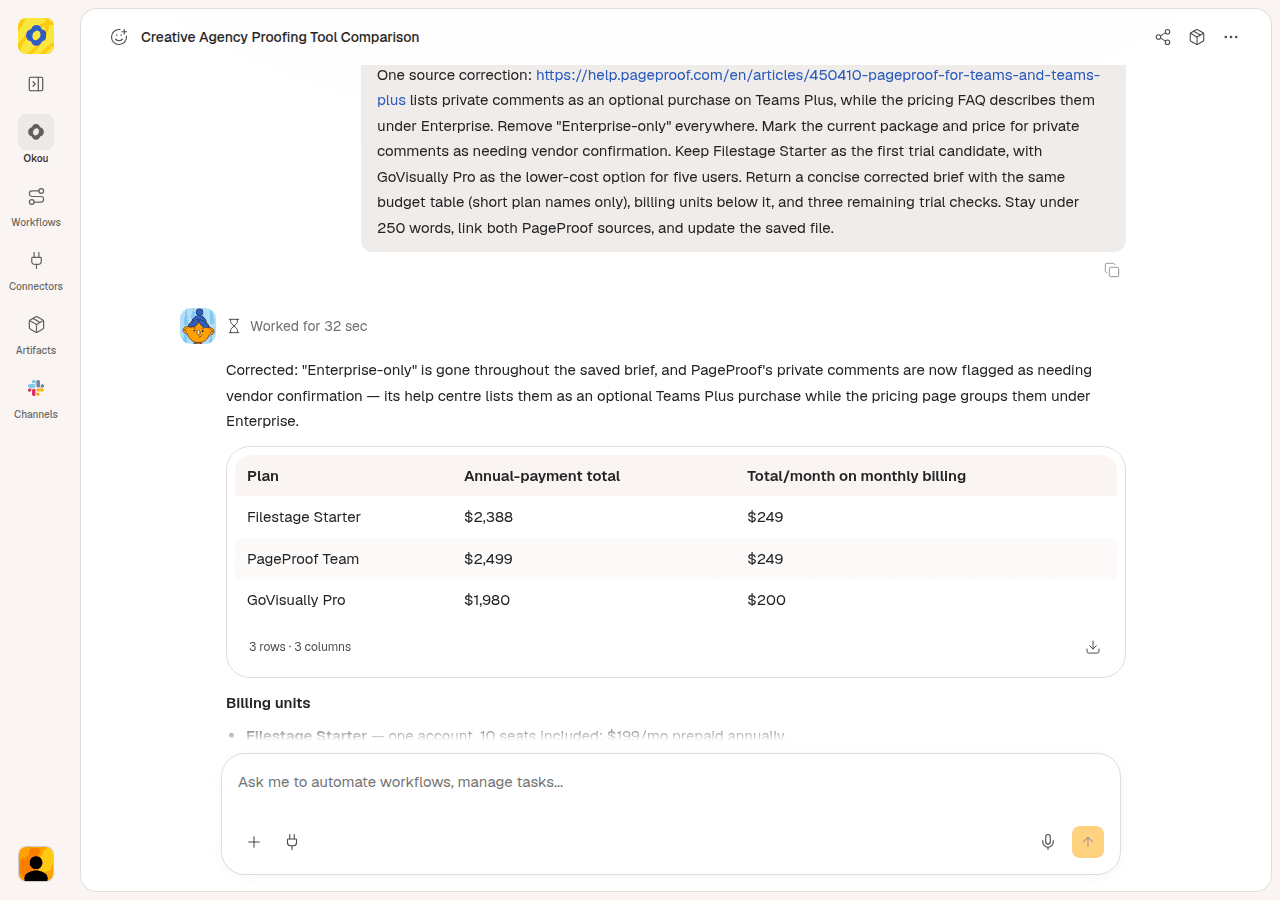
We supplied the conflicting official source and asked Okou to remove the exclusive plan claim.
If the available pages still don't settle the question, write the uncertainty plainly:
We haven't confirmed whether this plan includes the client access we need. Ask the vendor before putting it in the proposal.
That's actionable. “No client access” would imply a fact the research hasn't established.
5. Change the recommendation if the facts change
After correcting a mistake, return to the beginning of the report. Does the headline or recommendation still make sense?
Imagine the cheapest plan doesn't include the team feature you need. Correcting the price table is only half the work. The report must also stop recommending that plan on the old basis.
A revised recommendation might read:
Compare GoVisually Pro for this trial. The cheaper Lite plan excludes video, which is one of our requirements. Reconsider Lite only if video review is no longer part of the job.
This gives the reader a choice they can understand. It connects the evidence to the decision.
A short prompt for reviewing an AI report
Use this with the report and your original question:
Review this report before I use it to decide [decision]. Find the facts that could change the recommendation. For each, show the original source, check that it applies to our situation, and recalculate any numbers. Explain unresolved disagreements in plain language. Then update the recommendation if any corrections affect it.
An AI review can help organize the checking. You should still inspect the important sources. Two assistants repeating the same claim doesn't independently confirm it.
In Okou, you can continue in the same research conversation and point to the specific statement you want checked. For example: “You priced this for one user. Recalculate it for the five internal team members and check whether clients need paid seats.” Give the correction enough context to change the answer.
Before you share the report
Read the recommendation once more and ask:
- Can I open the sources behind its main reasons?
- Do the prices, features, and dates apply to our situation?
- Can someone reproduce the important calculation?
- Is the remaining question clear enough for someone to follow up?
For a first discussion, an open question may be fine. For a purchase, that same question may need an answer first. A report saying “we still need a quote” can be useful without pretending the budget is settled.
If you're starting the research itself, our AI competitor research guide shows how to request sources while the work is being done.
Frequently asked questions
Does a citation mean the claim is correct?
No. It gives you a place to check. The source must support the wording and apply to the product, plan, date, and situation you're discussing.
Do I have to check every sentence?
For an initial review, prioritize facts that drive the recommendation. Public claims and consequential decisions need a more thorough review. A quick check of a few facts doesn't validate everything else in the report.
What if the source link is broken?
Look for the original document or another relevant source. Ask the report's author for the passage they used. Until you can verify it, keep that fact out of a confident recommendation.
Can I use this method for legal or security decisions?
It can help you organize the evidence, but it doesn't replace the appropriate specialist. A citation to a security page, for example, is not a review of the contract or audit report that applies to your purchase.