You need a competitor brief for Monday. Your team already uses ChatGPT, the client background is in Google Drive, and the final report needs to go to a colleague. Do you need another research tool?
Start with where the information lives and what you need at the end. Some tasks mainly require searching the web. Others depend on private work documents, an editable report, or follow-up work in another tool.
This guide compares five options for business research: ChatGPT deep research, Gemini Deep Research, Perplexity, Microsoft Researcher, and Okou. It is published by Okou and based on official product documentation reviewed on November 24, 2026. We also ran two example tasks in Okou: a customer-testimonial-tool messaging comparison and a client-approval-software comparison. The screenshots show Okou only; we haven't run a head-to-head accuracy or speed test across the five products.
Which assistant should you try first?
| If your work looks like this… | Consider | Why |
|---|---|---|
| “I need to investigate a question using websites and files.” | ChatGPT deep research | You can edit the research plan and specify which sites it should use. |
| “Our background material is in Google tools, and we'll edit the result in Docs.” | Gemini Deep Research | It supports eligible Google sources and export to Google Docs. |
| “I'm exploring a public topic and want to follow the sources as I go.” | Perplexity | It combines cited web search with a longer research mode. |
| “The answer depends on our Microsoft work files, emails, and meetings.” | Microsoft Researcher | It can combine accessible work content with web research. |
| “I need the research turned into work across our business tools.” | Okou | It can use connected business context, prepare deliverables, and carry out authorized follow-up tasks. |
These are starting points, not exclusive capabilities. Several tools can handle the same job. If one you already use can read the necessary sources and produce a useful result, try it before adding a subscription.
ChatGPT deep research: when you want to shape the investigation
Consider ChatGPT deep research when you have a complex question and want control over the plan and sources.
For example, you could upload a list of requirements and ask it to compare three software suppliers. Before the research starts, review its proposed plan. If it plans to compare every advertised feature, you can redirect it toward the four requirements that determine your purchase.
According to OpenAI's documentation, you can restrict the work to particular websites or prioritize those sites while allowing broader search. That is useful when you want to distinguish official product information from customer opinions.
The finished report includes citations or source links. You can download it in formats including Word, PDF, and Markdown, which makes it possible to hand the work to someone who doesn't use the same chat.
Check before choosing it: a connected app must specifically support deep research and be available to your account. OpenAI also says research uses app read actions, not write actions. If the next step is changing a CRM record, evaluate that task separately.
Gemini Deep Research: when the next stop is Google Docs
Gemini is worth considering when your team's research and editing already happen in Google tools.
Imagine an account manager preparing for a client strategy meeting. The brief is in Drive, relevant context is in email, and colleagues want to comment on a shared document. Gemini's documented source options and Docs export fit that sequence.
Google's help page describes an editable research plan, uploaded files, and sources including Search, Gmail, Drive, and NotebookLM notebooks. Gmail and Drive require the relevant Google Workspace connection. You can also deselect Search to limit research to the other selected material.
After reviewing the report, export it to Docs for edits and comments. That handoff may matter more to your team than adding another standalone research interface.
Check before choosing it: confirm that the sources are available in the account you'll actually use. Research limits vary, and Google says finding past reports depends on the Keep Activity setting. Save the reviewed copy somewhere your team expects to find it.
Perplexity: when you're starting with a public question
Perplexity is a candidate when your work starts by exploring a topic on the web.
You might begin with a broad question such as “What are independent retailers using for appointment booking?” As the answer takes shape, narrow the research to named products, a country, or the needs of a particular business.
Its official guidance describes cited search, Deep Research for more involved questions, and uploaded files alongside web sources. It also documents creating files such as documents and presentations on eligible plans.
For business use, make the follow-up specific. “Which is best?” gives the assistant little to work with. “Compare these three products for a shop with two bookable staff members and no receptionist” gives it a concrete job.
Check before choosing it: research and file-creation access depend on the plan. Confirm the output you need is available, and open the sources behind important claims. A cited answer still needs review.
Microsoft Researcher: when work context is in Microsoft 365
A public company profile can't tell you what your team promised the customer last week. For that, research needs your work content.
Microsoft Researcher is relevant when the answer depends on accessible files, emails, meetings, and chats as well as the web. Microsoft's product documentation describes combining those sources into a structured report with citations.
An account-planning task is a useful example. You might ask for a brief covering a customer's public priorities, unresolved issues in your correspondence, and the questions to bring to the next meeting. State whether it should use work sources, web sources, or both.
That instruction matters. A market overview and an internal account brief can concern the same company while requiring very different information.
Check before choosing it: confirm Researcher is available in your organization's setup and can reach the particular documents you need. Using Microsoft 365 doesn't mean every colleague can read the same files.
Okou: when research is part of a larger business task
Consider Okou when the assignment continues beyond finding information.
For example, a consultant may need to read an approved client brief, research competitors, prepare a comparison, and turn the findings into a presentation. A sales lead may need a company brief that takes existing customer conversations into account, followed by an email draft.
Okou's product documentation describes bringing business context and public research together, then producing deliverables or completing authorized actions. You can review the result and refine it in the same conversation.
A useful request might be:
Read this client brief and compare the three competitors it names. Prepare a short report with sources, then draft a presentation outline for our kickoff meeting. Use the client's stated priorities to decide what deserves attention.
The client brief changes the task. A general comparison might emphasize the biggest feature differences. A client planning to enter a particular market may care more about audience, local availability, or how competitors explain their offer.
For this guide, we used a public-source task in an Okou test workspace: compare Senja, Testimonial.to, and Famewall for a hypothetical homepage project. We reviewed the first answer, challenged an unsupported market-gap claim using Famewall's homepage, and narrowed the brief to independent consultants with a few client testimonials.
Click the screenshot to view it at full size.
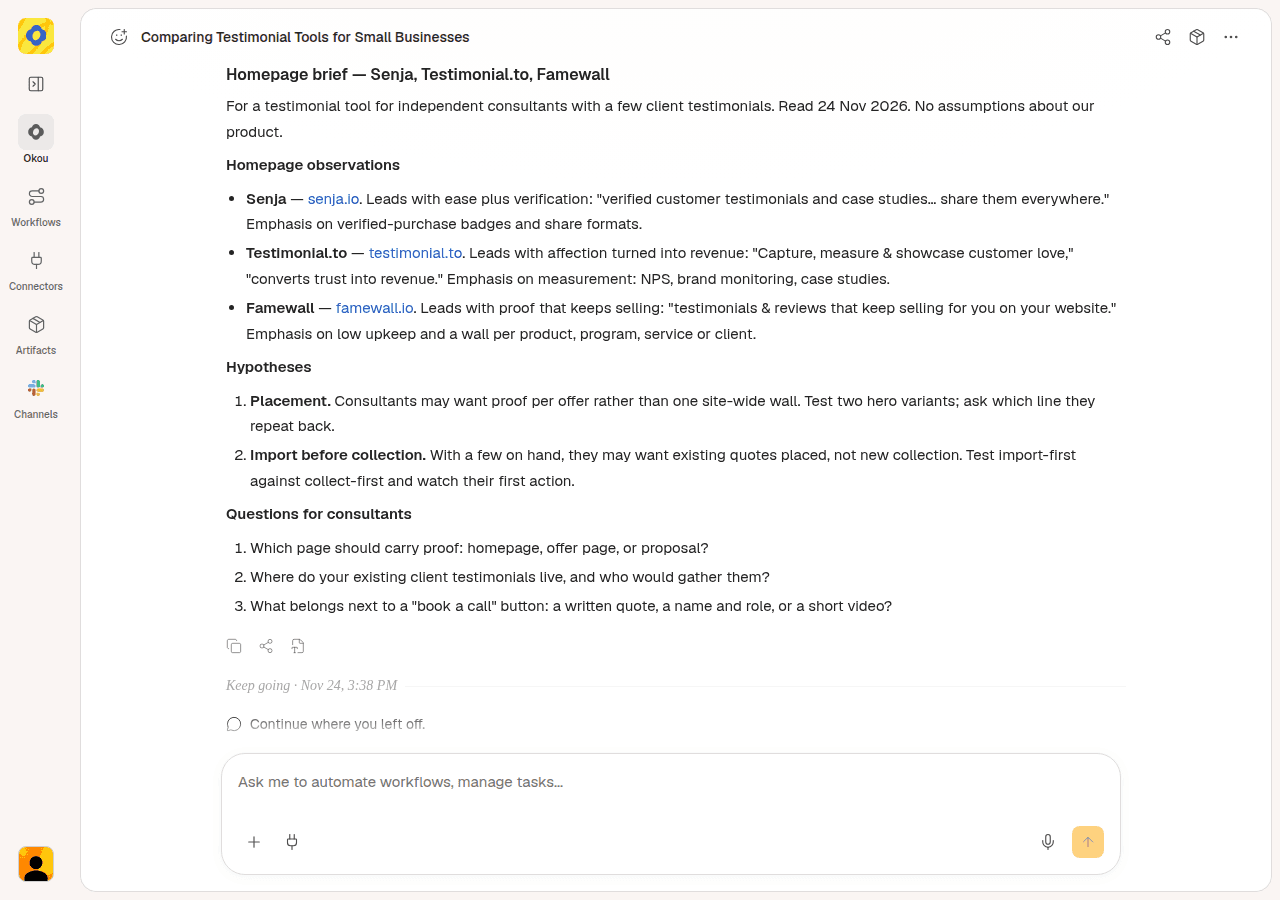
Our actual Okou result: product summaries, two messaging ideas to investigate, and questions for customers. This illustrates the task and review process, not a comparison of model accuracy.
The correction mattered. The first answer treated an existing use case as an unclaimed market position. The reviewed brief was more useful because it described what the websites actually said and kept suggested messaging separate from proven demand. We also replaced a wide table with short paragraphs to make the brief easier to read.
Once a method works, you can save it as a workflow for your team to reuse. Each person uses their own connected accounts and permissions; sharing the method doesn't share private customer material or credentials.
Check before choosing it: connect the tools and authorize the operations the task requires. Reading background, drafting an email, and sending that email are different actions. Confirm the intended handoff, especially when the research contains private information.
Try the same small task before committing
A useful trial is a task you already understand well enough to review. That makes it easier to spot missing context and weak conclusions.
Choose two candidates and give them the same assignment:
Compare these three suppliers for our small team. We need [requirements] and expect [number] people to use the service. Use official product pages for features and prices. Give me a short comparison with links, explain which option to try first, and list anything we need to confirm.
Then inspect the results:
Did it answer your actual question? A long market history doesn't help if you needed to choose a plan.
Do the important facts hold up? Open the pricing and feature sources. Recalculate the cost for your team.
Can you use the result? Check whether you can edit it, pass it to a colleague, and understand why the recommendation follows from the evidence.
How much correction did it need? Note which missing details you had to supply. Some corrections reveal an unclear brief; others reveal a limitation of the tool.
This is a suggested evaluation method, not a test we have performed across all five products. Our AI research fact-checking guide can help you review the answers.
What should you check about pricing?
Compare the plan you need for the actual task, rather than the headline subscription price alone.
Look at the research allowance, required source connections, file outputs, and any team administration needs. A tool you already pay for may be sufficient. A cheaper plan may become a poor fit if it can't read the documents your work depends on.
Because access and allowances change, this guide links to the official product documentation rather than presenting a price table that mixes unlike plans.
Frequently asked questions
Which AI research assistant is the most accurate?
This comparison doesn't establish an accuracy winner. Test candidates on the same relevant task and check the underlying claims. A strong answer on one topic doesn't prove the tool will perform equally well on another.
Do I need a research mode for every question?
No. A simple fact may only require opening an official page or running a quick search. Longer research is useful when the answer requires several sources, a comparison, or working through conflicting information.
Can these tools use private company documents?
Several support files or connected work sources. Availability depends on the product, account, and permissions. Use an organization-approved setup and check the sources available to the person running the task.
What should a small business start with?
Try the tool you already use on one well-defined task. If it can't reach the necessary information or deliver a usable result, use that gap to choose the next candidate. Our competitor research walkthrough provides a concrete task to begin with.